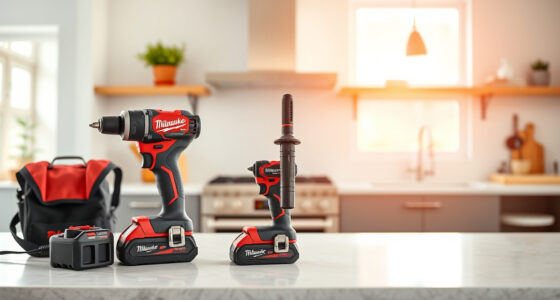
If your Milwaukee power tool charger keeps blinking red, it signals an issue that needs addressing before you can resume work. This guide provides clear, safe troubleshooting steps to identify and resolve common problems, helping you get back to your tasks quickly.
Understanding what causes the red blinking light and knowing how to troubleshoot safely can save you time and avoid costly repairs or replacements. Follow these steps carefully, and remember to prioritize safety at all times.
Key Takeaways
| Identify blinking patterns | Red blinking indicates errors or charging issues. |
| Check battery and connections | Ensure batteries and contacts are clean and seated properly. |
| Inspect for damage | Look for physical damage on batteries, charger, or contacts. |
| Use compatible batteries | Only charge Milwaukee M18 batteries with the original or compatible charger. |
| Follow safety precautions | Unplug charger before inspecting or cleaning to avoid electrical shocks. |
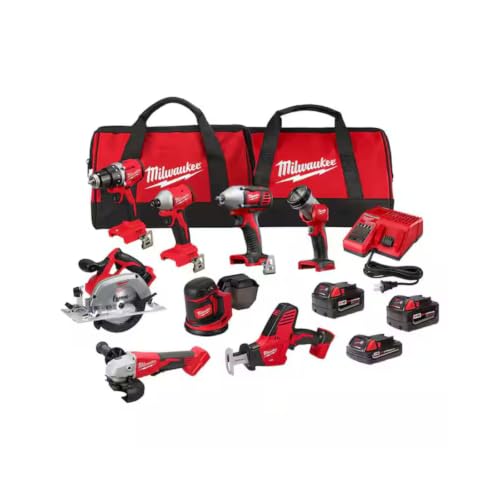
Milwaukee M18 18V Cordless Power Tool Combo Kit, 8-Tool Set, 3 Batteries, 2 Tool Bags, Charger Included
COMPLETE KIT: Includes hammer drill, impact driver, circular saw, angle grinder, reciprocating saw, multi-tool, work light, and 3...
As an affiliate, we earn on qualifying purchases.
Understanding the Red Blinking Indicator
The red blinking light on your Milwaukee charger typically signals a problem with the battery, the charger, or the connection. Depending on the pattern (slow or fast blink), it can indicate different issues such as a faulty battery, overheating, or a connection problem. Refer to your charger’s manual for specific blinking codes, but generally, a steady or blinking red light indicates that something needs attention before charging can continue.
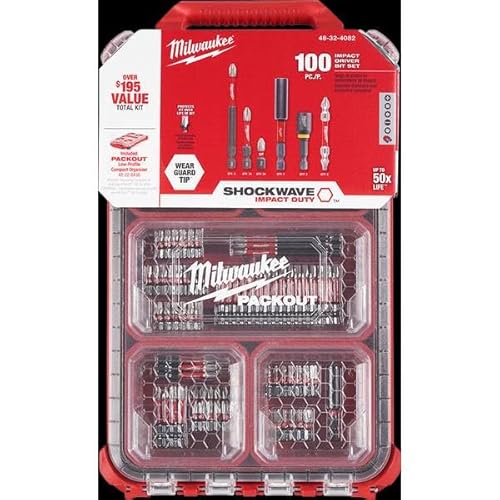
Milwaukee Shockwave 100pcs Impact Driver Bit Set Packout
As an affiliate, we earn on qualifying purchases.
Step 1: Ensure Proper Connection and Battery Seating
- Unplug the charger from the power outlet for safety.
- Remove the battery from the charger by pressing the release button.
- Inspect the battery contacts for dirt, debris, or corrosion. Clean gently with a dry cloth or isopropyl alcohol if needed.
- Reinsert the battery firmly into the charger, ensuring it is properly seated.
- Plug the charger back into the power outlet and observe the blinking pattern.
Step 2: Check the Battery Condition
If the charger still blinks red, test the battery by using a different compatible Milwaukee M18 battery if available. A faulty or deeply discharged battery can cause the charger to blink red. If the new battery charges normally, the original battery may need replacement.
Alternatively, if your batteries are old or have been exposed to extreme conditions, consider replacing them with new ones, such as the Milwaukee 48-11-1850R 5.0 Ah XC resistant batteries or the M18 REDLITHIUM HIGH Output XC 6.0Ah batteries for extended runtime.
Step 3: Examine the Charger for Damage or Overheating
Inspect the charger unit for visible damage, such as cracks, burn marks, or warping. Check for accumulation of dust or debris around vents, which can cause overheating. Allow the charger to cool if it feels hot, and clean vents gently with compressed air.
If the charger is damaged or continues to blink red after these checks, it may need professional repair or replacement. Do not attempt to disassemble or repair electrical components yourself.
Step 4: Test with Compatible Accessories and Settings
Ensure you are using the original Milwaukee charger designed for M18 batteries. Using incompatible chargers or third-party adapters can cause blinking issues. Also, verify that the battery is not frozen or excessively cold, as cold batteries may take longer to charge or cause blinking signals.
Allow batteries to reach room temperature before charging. If the problem persists, try charging a different battery to isolate whether the issue is with the battery or the charger.
Additional Tips and Safety Precautions
- Always unplug the charger before cleaning or inspecting it to prevent electrical shocks.
- Use only Milwaukee-approved batteries and chargers to ensure compatibility and safety.
- Avoid charging batteries in extreme temperatures—preferably between 32°F and 113°F (0°C to 45°C).
- If the charger continues to blink red after troubleshooting, contact Milwaukee customer support or seek professional repair.
The Products in This Guide

Milwaukee M18 18V Cordless Power Tool Combo Kit
- ✔ Tool count: 8
- ✔ Battery type: Lithium-ion
- ✔ Includes: 2 tool bags

Milwaukee Shockwave 100pcs Impact Driver Bit Set Packout
- ✔ Set includes: 100 bits
- ✔ Case type: Packout
- ✔ Impact rated: Yes
Milwaukee M18 18V Cordless Power Tool Combo Kit
This complete Milwaukee M18 18V Cordless Power Tool Combo Kit offers excellent performance for various construction and remodeling tasks. With 8 tools, 3 batteries, and a rapid charger, it’s designed for durability and versatility on the jobsite.
Pros:
- Includes 8 versatile tools
- 3 high-capacity batteries for extended use
- Rapid charger minimizes downtime
- Organized storage with 2 tool bags
Cons:
- Heavy weight for prolonged use
- Initial cost may be high
- Battery life depends on usage intensity
Best for: Construction, remodeling, maintenance projects requiring reliable power tools
Not ideal for: Light-duty tasks or infrequent DIY projects
Bottom line: A comprehensive, durable power tool set perfect for professional use.
Milwaukee Shockwave 100pcs Impact Driver Bit Set Packout
This 100-piece Impact Driver Bit Set Packout offers a comprehensive range of bits to maximize your Milwaukee impact driver’s performance. It’s ideal for various fastening tasks and comes in a durable Packout case for easy transport.
Pros:
- Wide variety of bits
- Durable Packout case
- High-quality impact bits
- Great value for money
Cons:
- Bits may wear out with heavy use
- Requires impact driver compatibility
- Limited to impact driver applications
Best for: Professional contractors and DIY enthusiasts needing versatile impact driver bits
Not ideal for: Regular screwdrivers or non-impact tools
Bottom line: A comprehensive impact driver bit set that enhances your tool’s capabilities.
Frequently Asked Questions
Why is my Milwaukee charger blinking red?
A blinking red light usually indicates a problem such as a bad connection, overheating, or a faulty battery. Check the battery seating, condition, and ensure the charger and batteries are compatible.
Can I use any batteries with my Milwaukee charger?
No, only Milwaukee M18 batteries that are compatible with your charger should be used to avoid damage and ensure proper charging.
What should I do if my charger continues blinking red after troubleshooting?
If the issue persists, disconnect all components, allow the charger to cool, clean contacts, and try again. If it still doesn’t work, contact Milwaukee support or replace the charger.
How do I prevent my charger from blinking red in the future?
Store batteries in a cool, dry place, avoid extreme temperatures, use genuine Milwaukee batteries, and regularly inspect for damage or debris.
Is it safe to open or repair the charger myself?
No, opening the charger can be dangerous due to electrical components. Seek professional repair or contact Milwaukee for warranty service.
Getting Your Milwaukee Charger Back in Action
Encountering a blinking red light on your Milwaukee charger can be frustrating, but most issues can be resolved with careful inspection and troubleshooting. Always prioritize safety, use genuine parts, and follow recommended procedures. If problems persist, professional support is recommended to ensure your tools remain safe and effective for your projects.
Affiliate disclosure: As an Amazon Associate we earn from qualifying purchases. Prices and availability are accurate as of the time of publishing.