The best car diagnostic scan tools make it easier to understand warning lights, check live vehicle data, and decide what needs attention before a repair visit. I rank the Innova 5610 as the best overall for its bidirectional controls and broader diagnostic abilities, while the BlueDriver Pro stands out for app-based code details and the FOXWELL NT301 for straightforward live-data checks. The main tradeoff is between simple engine-code readers and pricier tools with broader system coverage, service functions, or active tests. Compatibility also varies by vehicle, so a feature listed on a scanner may not work on every make and model. Read on for the full breakdown and a guide to choosing the right tool for your car.

Get business pricing on garage and car supplies
- Business-only prices and quantity discounts
- Tax-exempt purchasing
- Multiple users, one account, clear invoices
Complete the kit


Key Takeaways
- The Innova 5610 leads this group for buyers who want bidirectional controls, but its more advanced functions are unnecessary for basic check-engine-light readings.
- BlueDriver Pro and FIXD both pair with a phone, but app-based convenience means buyers should weigh software dependence and vehicle coverage against the simplicity of a dedicated handheld scanner.
- The FOXWELL NT604 Elite targets ABS, SRS, engine, and transmission diagnostics, illustrating why system coverage can matter more than a long list of general features.
- The FOXWELL NT301 and ANCEL AD310 favor direct, uncomplicated code reading; they are better matches for basic checks than tools with service resets or active tests.
- Battery-testing features on the TopDiag T300PRO and Innova 5210 broaden their role, but buyers should distinguish battery checks from full diagnostics across all vehicle systems.
| FOXWELL NT301 OBD2 Scanner with Live Data |  | Best for Straightforward Engine Checks | Brand: FOXWELL | Model: NT301 | Screen: 2.8-inch color screen | VIEW LATEST PRICE | See Our Full Breakdown |
| Innova 5610 OBD2 Bidirectional Scan Tool |  | Best for Active Troubleshooting | Brand: Innova | Model: 5610 | Vehicle compatibility: Most OBD2 vehicles from 1996–2023; compatibility varies | VIEW LATEST PRICE | See Our Full Breakdown |
| BLCKTEC 460T OBD2 Car Diagnostic Scanner with 12+ Reset Functions |  | Best for Service Resets | Diagnostic systems: Engine, transmission, ABS, SRS, and other vehicle ECUs | Service functions: 12+ reset and service functions, including oil, ABS bleeding, EPB, SAS, DPF, throttle, battery, and TPMS | Data features: Live data, freeze-frame data, code reading and clearing, graphing, recording, and replay | VIEW LATEST PRICE | See Our Full Breakdown |
| BlueDriver Pro Bluetooth OBD2 Scanner |  | Best Phone-Based Diagnostic Reports | Brand: BlueDriver | Model: Pro | Manufacturer: Lemur Vehicle Monitors | VIEW LATEST PRICE | See Our Full Breakdown |
| FIXD Bluetooth OBD2 Scanner for iPhone and Android |  | Best for Plain-Language Explanations | Brand: FIXD | Item type: Bluetooth OBD2 scan tool and code reader | Compatibility: iPhone and Android | VIEW LATEST PRICE | See Our Full Breakdown |
| ANCEL AD310 OBD II Car Code Reader | 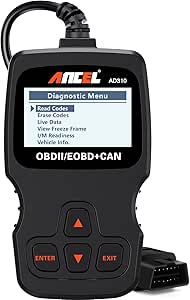 | Best for Straightforward Check-Engine Diagnosis | Brand and model: ANCEL AD310 | Compatibility: OBD II vehicles; 1996 and newer US vehicles, 2000 and newer EU and Asian vehicles | Supported protocols: KWP2000, J1850 VPW, ISO9141, J1850 PWM, CAN | VIEW LATEST PRICE | See Our Full Breakdown |
| FOXWELL NT604 Elite OBD2 Scanner for ABS, SRS, Engine, and Transmission |  | Best for Multi-System Diagnostics | Brand and model: FOXWELL NT604 Elite | Diagnostic systems: Engine, ABS, SRS, and transmission | Vehicle coverage: Over 60 car brands; compatibility varies by vehicle | VIEW LATEST PRICE | See Our Full Breakdown |
| TopDiag T300PRO OBD2 Scanner and 12V Battery Tester |  | Best for Combined Scan and Battery Checks | Brand and model: TopDiag T300PRO | Functions: OBD2 code reader, 12V battery analyzer, and 16-pin ECU breakout tester | Vehicle compatibility: OBD2 gasoline vehicles and 12V motorcycles | VIEW LATEST PRICE | See Our Full Breakdown |
| Autel AL319 OBD2 Scanner and Check Engine Code Reader |  | Best for Beginners | Brand and model: Autel AL319 | Compatibility: Post-1996 OBD II vehicles | Functions: Read and clear DTCs, DTC lookup, live data, freeze frame, I/M readiness, vehicle information | VIEW LATEST PRICE | See Our Full Breakdown |
| VDIAGTOOL VD10 OBD2 Scanner and Code Reader |  | Best for On-Screen Code Definitions | Brand and model: VDIAGTOOL VD10-NEW; part number VDT-VD10-N | Functions: Read and clear codes, live data, freeze frame, I/M readiness, vehicle information | DTC database: More than 3,000 codes | VIEW LATEST PRICE | See Our Full Breakdown |
| ANCEL AD410 Enhanced OBD2 Scanner and Vehicle Code Reader |  | Best for Emissions Checks | Model: AD410 | Display: 2.4-inch color screen | Diagnostics: Engine and emissions codes, live data, freeze frame, I/M readiness, O2 sensor test, EVAP test, vehicle information, and MIL status | VIEW LATEST PRICE | See Our Full Breakdown |
| MOTOPOWER MP69033 OBD2 Car Diagnostic Scanner | 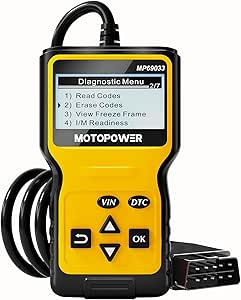 | Best for Simple, Multi-Language Checks | Model: MP69033 | Display: 2.8-inch LCD with white backlight and contrast adjustment | Functions: Read and clear engine codes, live data, freeze frame, I/M readiness, vehicle information, and VIN lookup | VIEW LATEST PRICE | See Our Full Breakdown |
| V011 Bluetooth OBD2 Scanner for iOS and Android |  | Best for Smartphone-Based Data Charts | Model: V011 | Connectivity: Bluetooth 5.4 | Mobile compatibility: iOS and Android | VIEW LATEST PRICE | See Our Full Breakdown |
| Innova 5210 OBD2 Scanner and Engine Code Reader with Battery Testing |  | Best for Battery and Alternator Checks | Model: 5210 | Functions: Engine and some ABS code reading and clearing, battery and alternator testing, live data, oil light reset, and emissions readiness | Vehicle coverage: Most US, Asian, and European vehicles from 1996 onward; feature coverage varies | VIEW LATEST PRICE | See Our Full Breakdown |
| Zmoon ZM201 OBD2 Scanner and Engine Code Reader |  | Best Standalone Pick for Emissions Testing | Model: ZM201 | Display: 2.8-inch color screen with adjustable brightness and light or dark modes | Vehicle coverage: Standard 16-pin OBD2 vehicles: US-based models after 1996, EU-based after 2002, and Asia-based after 2008 | VIEW LATEST PRICE | See Our Full Breakdown |
More Details on Our Top Picks
FOXWELL NT301 OBD2 Scanner with Live Data
The FOXWELL NT301 is a practical pick for drivers who want to read and clear engine codes without relying on a phone app. Its 2.8-inch color screen shows live sensor data, including graphing, while I/M readiness indicators help check whether a vehicle may be ready for an emissions test. That keeps routine troubleshooting simple and direct. Compared with the Innova 5610 or BLCKTEC 460T, the NT301 is far more limited: it does not diagnose ABS, SRS, or TPMS, and it lacks their broader system coverage and service functions. That narrower scope is also its appeal for buyers who only need basic engine diagnostics. Vehicle support and available functions vary, so I would skip it if you need to investigate warning lights outside the engine system.
Pros:- Reads and clears engine fault codes without a phone or subscription
- Displays and graphs live sensor data
- I/M readiness checks use LED indicators for a quick status check
- Supports multiple OBDII protocols
Cons:- Does not provide ABS, SRS, or TPMS diagnostics
- Vehicle compatibility and available functions vary
- Its engine-only scope is limited beside the Innova 5610 and BLCKTEC 460T
Best for: Drivers with a 1996-or-newer OBDII vehicle who want a standalone tool for engine codes, live sensor checks, and emissions-readiness checks.
Not ideal for: Owners troubleshooting ABS, SRS, TPMS, or other non-engine warnings, since this scanner does not diagnose those systems.
- Brand:FOXWELL
- Model:NT301
- Screen:2.8-inch color screen
- Supported protocols:KWP2000, J1850 VPW, ISO9141, J1850 PWM, CAN
- Compatibility:Most 1996+ U.S. gasoline cars, light trucks, and SUVs; many 2000+ European and Asian models; compatible 12V diesel vehicles with OBD2
- Weight:0.16 kg
- Included components:NT301 scanner, USB cable, quick reference guide
- Warranty:12 months
Our verdict“Choose the NT301 for simple, screen-based engine diagnostics and emissions checks, but pick a broader scanner if you need multiple-system coverage.”
Innova 5610 OBD2 Bidirectional Scan Tool
The Innova 5610 suits owners who want to do more than read a stored code: its bidirectional controls can command select vehicle functions, helping narrow down whether a component responds during diagnosis. It also covers select OEM systems such as ABS, SRS, transmission, and engine, with enhanced live data and supported reset or relearn procedures. Compared with the FOXWELL NT301, it reaches well beyond basic engine checks; against the BLCKTEC 460T, its appeal is the combination of active controls and ASE-certified technical support rather than a stated menu of 12-plus service functions. The tradeoff is that coverage depends on make, model, and year, so buyers should verify vehicle support before counting on a particular test or procedure. Free updates and three-language support add practical value for ongoing ownership.
Pros:- Bidirectional controls can help test supported vehicle functions
- Enhanced live data covers select ABS, SRS, transmission, and engine systems
- Supports special reset and relearn procedures on compatible vehicles
- Free updates and ASE-certified technical support are included
Cons:- System and function coverage varies by make, model, and year
- Its feature set may be more than basic code-reading needs require
- The supplied information does not specify a fixed list of supported service procedures
Best for: DIY owners who want to run active tests and work with select ABS, SRS, transmission, and engine data on a supported vehicle.
Not ideal for: Shoppers who need guaranteed support for a specific advanced function without first checking vehicle coverage, or who only need a simple engine-code reader.
- Brand:Innova
- Model:5610
- Vehicle compatibility:Most OBD2 vehicles from 1996–2023; compatibility varies
- Supported languages:English, Spanish, French
- Diagnostic coverage:OBD2 and select OEM systems, including ABS, SRS, transmission, and engine
- Functions:Bidirectional controls, enhanced live data, select resets and relearn procedures
- Weight:1.3 pounds
- Included components:Code reader with protective boot, manual, OBD2 cable, soft storage pouch, USB cable
Our verdict“Pick the Innova 5610 if active testing and select OEM-system diagnostics matter more than the NT301’s simpler engine-only operation.”
BLCKTEC 460T OBD2 Car Diagnostic Scanner with 12+ Reset Functions
The BLCKTEC 460T is the strongest fit here for owners who want broad diagnostics plus routine service procedures in one handheld tool. It reads engine, transmission, ABS, and SRS codes, and its 12-plus reset and service functions include oil, EPB, SAS, DPF, battery, and TPMS tasks where the vehicle supports them. Live and freeze-frame data, graphing, and recording up to four data streams can help separate an intermittent fault from a single snapshot. Compared with the FOXWELL NT301, it reaches many more systems; compared with the Innova 5610, its appeal is the wider stated reset-function menu, while the Innova offers bidirectional controls and ASE-certified support. The limitation is compatibility: functions vary by vehicle, and use is limited to the USA and Canada.
Pros:- Reads codes across engine, transmission, ABS, and SRS systems
- Offers more than 12 reset and service functions
- Graphs, records, and replays up to four live data streams
- Includes free lifetime updates and RepairSolutions2 app access
Cons:- Reset and diagnostic functions vary by vehicle
- Scanner and app use is limited to the USA and Canada
- Its wider feature set may be unnecessary for drivers who only need engine-code checks
Best for: DIY mechanics in the USA or Canada who maintain compatible vehicles and want multi-system code reading alongside common service resets.
Not ideal for: Drivers outside the USA and Canada, or owners who need a particular reset procedure without confirming support for their exact vehicle.
- Diagnostic systems:Engine, transmission, ABS, SRS, and other vehicle ECUs
- Service functions:12+ reset and service functions, including oil, ABS bleeding, EPB, SAS, DPF, throttle, battery, and TPMS
- Data features:Live data, freeze-frame data, code reading and clearing, graphing, recording, and replay
- Live data recording:Can graph and record up to four live data streams
- Vehicle compatibility:OBD2-compliant vehicles from 1996 onward; function support varies by vehicle
- Region:USA and Canada
- Updates:Free lifetime updates
- App:RepairSolutions2
Our verdict“Choose the 460T for a broad handheld toolkit with many service resets, provided your vehicle and region are supported.”
BlueDriver Pro Bluetooth OBD2 Scanner
The BlueDriver Pro is a good match for drivers who prefer a phone interface and want more than generic check-engine codes. Its Bluetooth connection pairs with an iOS or Android device, where the app provides live data, smog-readiness checks, and technician-verified repair reports. On supported vehicles, enhanced diagnostics extend to ABS, SRS, TPMS, and transmission systems. That gives it a broader diagnostic reach than the FOXWELL NT301, though the NT301 does not depend on a phone. Compared with the FIXD, BlueDriver emphasizes repair reports and enhanced system codes rather than issue explanations and maintenance reminders across multiple vehicles. The tradeoff is the phone requirement: buyers need a compatible device, and advanced coverage is not universal. No subscription fees keep app access from becoming an ongoing service commitment.
Pros:- Wireless Bluetooth connection works with iOS and Android devices
- Provides technician-verified repair reports and live data
- Reads enhanced codes for several systems on supported vehicles
- No subscription fees
Cons:- Requires a compatible phone or tablet and the app
- Enhanced system coverage depends on vehicle compatibility
- Its phone-based workflow is less direct than the standalone FOXWELL NT301
Best for: Phone-first owners who want live data, repair reports, and enhanced diagnostics for supported systems on a compatible vehicle.
Not ideal for: Drivers who want a standalone scanner with its own screen, or who need guaranteed ABS, SRS, TPMS, or transmission support without checking compatibility.
- Brand:BlueDriver
- Model:Pro
- Manufacturer:Lemur Vehicle Monitors
- Part number:LSB2
- Connectivity:Bluetooth
- Compatible devices:iOS and Android phones or tablets
- Vehicle compatibility:Gas-powered vehicles made in 1996 or newer; select light-duty trucks and diesels
- Diagnostic systems:Check Engine, ABS, SRS/Airbag, TPMS, and transmission on supported vehicles
- Warranty and returns:180-day money-back guarantee; defective products accepted within one year
Our verdict“Choose BlueDriver if you want app-based reports and enhanced diagnostics without a subscription, and are comfortable using your phone as the display.”
FIXD Bluetooth OBD2 Scanner for iPhone and Android
The FIXD Bluetooth OBD2 Scanner is aimed at owners who want a scan result translated into accessible language rather than a list of code definitions. Through its iPhone or Android app, it can explain more than 39,000 vehicle issues, retain scan history, track maintenance reminders, and support multiple vehicles. That makes it more approachable for household fleets than the FOXWELL NT301, which offers a built-in screen but focuses on engine diagnostics and live sensor data. Compared with the BlueDriver Pro, FIXD puts more emphasis on issue explanations and maintenance tracking; BlueDriver’s stated strengths include technician-verified repair reports and enhanced diagnostics on supported systems. FIXD supports gasoline and hybrid vehicles from 1996 onward and diesel vehicles from 2006 onward, but available features vary. Some advanced insights and mechanic support may require a premium upgrade.
Pros:- Explains more than 39,000 vehicle issues in simple terms
- Works wirelessly with iPhone and Android apps
- Tracks scan history and maintenance reminders for multiple vehicles
- Vehicle-powered, compact sensor avoids a separate battery
Cons:- Some functions vary by make and model
- Advanced insights and mechanic support may require a premium upgrade
- Requires a compatible phone and app, unlike the screen-equipped FOXWELL NT301
Best for: Less-experienced owners of one or more compatible vehicles who want understandable code explanations, scan history, and maintenance reminders in an app.
Not ideal for: Buyers who want a standalone display, advanced diagnostics without checking vehicle support, or all repair recommendations and mechanic support without an optional upgrade.
- Brand:FIXD
- Item type:Bluetooth OBD2 scan tool and code reader
- Compatibility:iPhone and Android
- Vehicle compatibility:Gasoline and hybrid vehicles 1996+; diesel vehicles 2006+
- Supported issues:39,000+
- Power source:Vehicle powered
- Weight:27.22 g
- Dimensions:1.5 × 0.5 × 1.75 in
- Included components:FIXD mobile app, OBD2 scanner
Our verdict“Pick FIXD if clear explanations and multi-vehicle maintenance tracking matter more to you than a standalone screen or a fixed set of advanced tests.”
ANCEL AD310 OBD II Car Code Reader
The ANCEL AD310 is a practical pick for drivers who mainly want to read and clear emissions-related check-engine codes without adding app setup or extra tools. It also shows live data, freeze-frame information, and I/M readiness, so you can check what was happening when a fault appeared and whether the vehicle is ready for an emissions test. Unlike the FOXWELL NT604 Elite, it does not scan ABS, SRS, or transmission systems; that narrower scope keeps its job simple but rules it out for broader fault-finding. The unit draws power from the OBD II port and uses a 2.5-foot cable, making it easy to keep in a glove box. I would skip it if you need non-engine diagnostics or maintenance resets.
Pros:- Reads and clears emissions-related trouble codes
- Displays live data, freeze-frame information, and I/M readiness
- Runs from the vehicle’s OBD II connector without batteries or a charger
- Compact, lightweight design with a 2.5-foot cable
Cons:- Limited to emissions-related diagnostics, unlike the FOXWELL NT604 Elite’s four-system coverage
- Requires a compatible OBD II interface and vehicle
Best for: Drivers who want a simple, handheld reader for emissions-related codes and emissions-test readiness on a compatible OBD II vehicle.
Not ideal for: Owners tracking ABS, SRS, transmission, or other non-emissions faults, since the AD310 does not diagnose those systems.
- Brand and model:ANCEL AD310
- Compatibility:OBD II vehicles; 1996 and newer US vehicles, 2000 and newer EU and Asian vehicles
- Supported protocols:KWP2000, J1850 VPW, ISO9141, J1850 PWM, CAN
- Diagnostics:Emission-related trouble codes
- Data and checks:Live data, freeze-frame information, and I/M readiness
- Cable length:2.5 ft
- Power:Powered by the vehicle’s OBD II connector
- Weight and dimensions:12 oz; 8.9 x 6.9 x 1.4 in
Our verdict“Choose the AD310 for uncomplicated engine-code checks and emissions readiness, but choose a broader scanner if you need ABS, SRS, or transmission diagnosis.”
FOXWELL NT604 Elite OBD2 Scanner for ABS, SRS, Engine, and Transmission
Among these handheld options, the FOXWELL NT604 Elite makes the strongest case for buyers who need more than engine-code access: it diagnoses engine, ABS, SRS, and transmission systems. That wider reach can help narrow down warning lights outside the powertrain, while live data, a built-in DTC library, and AUTOVIN add useful context. It is a more capable diagnostic choice than the ANCEL AD310, but it is not a service tool: functions such as oil resets and ABS bleeding are not supported, and it cannot clear SRS crash or collision data. Coverage also varies by vehicle, so the stated support for over 60 brands is not a guarantee that every function works on every model. The included case and lifetime updates suit owners who plan to keep the scanner on hand.
Pros:- Scans engine, ABS, SRS, and transmission systems
- Includes live data, a built-in DTC library, data playback, and printing
- Lifetime updates are included without an extra software fee
- Comes with a protective case and AUTOVIN feature
Cons:- Does not provide service functions such as oil resets or ABS bleeding
- Vehicle coverage and AUTOVIN availability vary by model
- Cannot clear SRS crash or collision data
Best for: DIY owners who want to investigate engine, ABS, SRS, and transmission faults across supported vehicles and value a case and ongoing software updates.
Not ideal for: Drivers seeking oil-service resets, ABS bleeding, SRS crash-data clearing, or guaranteed feature coverage for a particular vehicle without checking compatibility.
- Brand and model:FOXWELL NT604 Elite
- Diagnostic systems:Engine, ABS, SRS, and transmission
- Vehicle coverage:Over 60 car brands; compatibility varies by vehicle
- Diagnostic features:Live data stream, DTC library, data playback and printing, I/M readiness, AUTOVIN
- Updates:Lifetime updates; no extra software fee
- Included components:Diagnostic cable, USB cable, quick start guide, user manual, protective case
- Service functions:Does not support functions such as oil resets or ABS bleeding
Our verdict“Pick the NT604 Elite when multi-system fault diagnosis matters more than maintenance resets or advanced SRS data clearing.”
TopDiag T300PRO OBD2 Scanner and 12V Battery Tester
The TopDiag T300PRO is the most task-diverse pick here: it pairs basic OBD2 engine diagnostics with 12V battery, starter, and alternator tests, plus an ECU breakout tester. That combination suits a garage or DIY owner who wants to check whether a starting problem points to the battery or charging system before focusing on engine codes. Its 2.8-inch color screen and data recording and playback give it a more information-rich approach than the Autel AL319, which centers on conventional OBD II code reading and readiness checks. The tradeoff is vehicle scope: the T300PRO is specified for OBD2 gasoline vehicles and 12V motorcycles, while diesel compatibility is not stated. Its battery tests are for 12V lead-acid types, so it is not a universal battery analyzer.
Pros:- Combines OBD2 code reading with battery, starter, and alternator testing
- Tests SOH, SOC, CCA, and internal resistance on supported batteries
- Provides live data, recording and playback, and multiple emissions tests
- Includes an ECU breakout tester and a 2.8-inch color display
Cons:- Vehicle diagnostics are specified for gasoline vehicles; diesel support is not stated
- Battery testing is limited to compatible 12V lead-acid batteries
- Vehicle compatibility varies by region and model year
Best for: DIY owners and small workshops diagnosing gasoline-vehicle engine faults alongside 12V lead-acid battery, starter, and alternator problems.
Not ideal for: Diesel owners, drivers seeking ABS or SRS diagnosis, or anyone needing battery testing beyond the listed 12V lead-acid types.
- Brand and model:TopDiag T300PRO
- Functions:OBD2 code reader, 12V battery analyzer, and 16-pin ECU breakout tester
- Vehicle compatibility:OBD2 gasoline vehicles and 12V motorcycles
- Battery compatibility:12V flooded, AGM, EFB, and GEL lead-acid batteries
- Battery tests:SOH, SOC, CCA, internal resistance, starter cranking, and alternator charging
- Display:2.8-inch TFT color screen
- Included components:Battery clamp cable, scanner, and user guide
- Weight:1.1 lb
Our verdict“Choose the T300PRO if battery and charging-system checks belong beside your engine-code scans, not if you need broad system coverage or diesel support.”
Autel AL319 OBD2 Scanner and Check Engine Code Reader
The Autel AL319 is aimed at drivers who want an uncomplicated way to read a check-engine code and understand what to investigate next. Its on-screen DTC lookup provides code definitions on the scanner, while live data, freeze frame, and one-click I/M readiness add useful context without relying on a phone. Compared with the VDIAGTOOL VD10, the AL319 also lists vehicle information and seven language options, though both remain handheld OBD II readers rather than multi-system tools. The color display and plug-and-play operation make routine checks less fiddly, and it needs no batteries. Its stated compatibility is limited to post-1996 OBD II vehicles, so it is not the choice for older cars or for ABS, SRS, and transmission diagnosis. Buyers should confirm their vehicle is supported before relying on it.
Pros:- Reads and clears codes and provides on-device DTC lookup
- Shows live data, freeze-frame information, and I/M readiness
- Plug-and-play operation with a color display and one-click readiness check
- Supports seven languages and requires no batteries
Cons:- Compatibility is specified for post-1996 OBD II vehicles
- Focused on OBD II diagnostics rather than ABS, SRS, or transmission systems
Best for: First-time DIY users who want an easy handheld reader with built-in code definitions, live data, and a quick emissions-readiness check.
Not ideal for: Owners of pre-OBD II vehicles or anyone seeking ABS, SRS, transmission, or other non-engine system scans.
- Brand and model:Autel AL319
- Compatibility:Post-1996 OBD II vehicles
- Functions:Read and clear DTCs, DTC lookup, live data, freeze frame, I/M readiness, vehicle information
- Display:TFT color display
- Languages:7
- Power:No batteries required
- Weight:177 g
- Warranty:12 months
Our verdict“The AL319 fits beginners who want code explanations and straightforward readiness checks, while multi-system diagnostics call for a tool such as the FOXWELL NT604 Elite.”
VDIAGTOOL VD10 OBD2 Scanner and Code Reader
The VDIAGTOOL VD10 keeps its focus on everyday OBD II checks but adds a useful aid for interpreting results: a database of more than 3,000 code definitions shown on its two-line backlit display. It reads and clears codes, shows live data and freeze-frame details, checks I/M readiness, and retrieves vehicle information. Like the ANCEL AD310, it draws power from the vehicle and covers OBD II diagnostics rather than ABS, SRS, or transmission systems; the VD10’s code database and six language options make it a better fit for owners who want more explanation on the device. Its display is compact, not a color screen, and compatibility is limited to OBD II-compliant 12V cars, SUVs, and light trucks. The supplied warranty information conflicts, so I would verify the applicable term before purchase.
Pros:- Displays definitions from a database of more than 3,000 codes
- Provides live data, freeze-frame details, I/M readiness, and vehicle information
- Uses vehicle-port power for plug-and-play operation
- Supports six listed languages and multiple OBD II protocols
Cons:- Limited to OBD II-compliant 12V cars, SUVs, and light trucks
- Does not offer the wider system coverage of the FOXWELL NT604 Elite
- Warranty term is inconsistent in the supplied product information
Best for: Drivers who want an affordable-to-use handheld OBD II reader with built-in code definitions, live data, and multilingual menus for a compatible 12V vehicle.
Not ideal for: Owners needing non-engine system diagnosis, a large color display, or a clearly stated warranty term without first confirming the details.
- Brand and model:VDIAGTOOL VD10-NEW; part number VDT-VD10-N
- Functions:Read and clear codes, live data, freeze frame, I/M readiness, vehicle information
- DTC database:More than 3,000 codes
- Supported protocols:CAN, ISO9141, KWP2000, J1850 PWM, J1850 VPW
- Vehicle compatibility:OBD II-compliant 12V cars, SUVs, and light trucks
- Display:Two-line LCD with white backlight and contrast adjustment
- Languages:English, French, German, Spanish, Italian, Russian
- Power and warranty information:Powered through the vehicle’s OBD2 connector; supplied content states both 5 years and 3 years
Our verdict“Pick the VD10 for on-device code explanations and routine OBD II checks, but confirm its warranty and vehicle compatibility before buying.”
ANCEL AD410 Enhanced OBD2 Scanner and Vehicle Code Reader
The ANCEL AD410 is a good fit for owners who want more than a basic check-engine-code reader but do not need shop-level system coverage. Along with reading and clearing engine and emissions codes, it offers live data, freeze frame, O2 sensor testing, and EVAP testing—useful for investigating emissions-related warnings before a test. Its direct OBD2 connection and vehicle-powered design avoid app pairing and charging. Compared with the MOTOPOWER MP69033, the AD410 gives O2 and EVAP tests more prominence, while the MOTOPOWER adds a larger display and multi-language support. The tradeoff is a firm scope limit: this tool does not diagnose ABS, SRS, or transmission faults, and it cannot perform service resets or bidirectional controls. I’d choose it for engine and emissions checks, not broader vehicle troubleshooting.
Pros:- Combines engine-code reading and clearing with live data and freeze-frame information.
- Includes O2 sensor and EVAP tests for more focused emissions troubleshooting.
- Runs from the vehicle’s OBD2 port without a phone, Bluetooth connection, or separate battery.
- Supports several common OBD2 protocols and provides free software updates.
Cons:- Does not cover ABS, SRS, transmission, bidirectional controls, or service resets.
- Vehicle compatibility should be checked before purchase, especially for non-US vehicles.
Best for: DIY owners focused on check-engine warnings, emissions readiness, and O2 or EVAP checks who prefer a standalone scanner.
Not ideal for: Drivers diagnosing ABS, airbag, transmission, or service-reset issues, since those systems and functions are unsupported.
- Model:AD410
- Display:2.4-inch color screen
- Diagnostics:Engine and emissions codes, live data, freeze frame, I/M readiness, O2 sensor test, EVAP test, vehicle information, and MIL status
- Protocols:CAN, ISO9141, KWP2000, J1850 VPW, and J1850 PWM
- Vehicle coverage:Most 1996-and-newer US OBD2 vehicles and many 2000-and-newer EU and Asian OBD2 vehicles
- Power:Powered through the vehicle’s OBD2 port
- Unsupported functions:ABS, SRS, transmission diagnostics, bidirectional control, and service resets
- Software updates:Free updates
Our verdict“Choose the AD410 if emissions-focused engine diagnostics matter more than access to other vehicle systems.”
MOTOPOWER MP69033 OBD2 Car Diagnostic Scanner
The MOTOPOWER MP69033 keeps basic engine-code checks straightforward: plug it into the OBD2 port, read or clear codes, and use the built-in lookup library to make sense of results. Its 2.8-inch backlit screen is larger than the ANCEL AD410’s 2.4-inch display, which can make menus and data easier to read without reaching for a phone. It also supports six languages, a practical advantage for households that prefer a non-English interface. Live data, freeze frame, readiness checks, and VIN lookup add useful context beyond code retrieval. The compromise is that its coverage stays within standard OBD II functions; it does not reach ABS, airbag, or other non-OBD II systems. Compared with the V011, it avoids app dependence but lacks the phone-based charts that make sensor data easier to visualize.
Pros:- Built-in DTC lookup helps explain codes without requiring a separate reference or app.
- Displays live data, freeze frame, readiness information, vehicle information, and VIN.
- Backlit 2.8-inch LCD includes contrast adjustment.
- Supports six languages and nine OBD II protocols.
Cons:- Does not diagnose ABS, airbag, or other non-OBD II systems.
- Provides no stated service-reset or bidirectional functions.
Best for: Drivers who want a simple, standalone engine-code reader with an on-screen lookup library and a choice of interface languages.
Not ideal for: Owners who need ABS or airbag diagnostics, or who want charted sensor data through a smartphone app.
- Model:MP69033
- Display:2.8-inch LCD with white backlight and contrast adjustment
- Functions:Read and clear engine codes, live data, freeze frame, I/M readiness, vehicle information, and VIN lookup
- Protocols:Nine OBD II protocols
- Languages:English, German, Dutch, Spanish, French, and Italian
- Vehicle coverage:Most US vehicles from 1996, EU and Asian vehicles from 2000, and newer OBD II/CAN vehicles
- Power:Powered through the vehicle’s OBD II port
- Cable length:2.5 feet
Our verdict“Pick the MP69033 for accessible, multilingual engine-code checks without depending on a smartphone.”
V011 Bluetooth OBD2 Scanner for iOS and Android
The V011 suits owners who would rather study vehicle readings on a phone than use a small handheld screen. Its Bluetooth 5.4 connection pairs with the OBD Home app on iOS or Android, where live sensor data can be viewed in charts alongside diagnostic codes, freeze-frame data, and emissions readiness. That visual approach can help make changing readings easier to follow than the basic on-device displays on the ANCEL AD410 or MOTOPOWER MP69033. The app also comes with setup guides and troubleshooting email support, which may help first-time users get connected. In exchange, this is not a standalone tool: you need a compatible phone and app, and vehicle coverage should be checked before purchase. Some codes cannot be cleared until the underlying fault is repaired, so clearing codes is not a substitute for fixing the cause.
Pros:- Charts live sensor data for a more visual view of changing readings.
- Works with both iOS and Android through Bluetooth 5.4.
- Reads and clears codes and displays freeze-frame and emissions-readiness information.
- Provides setup guides and troubleshooting email support.
Cons:- Requires a compatible smartphone and the OBD Home app to use its diagnostic functions.
- Compatibility depends on the vehicle, so coverage should be checked before purchase.
- Some fault codes cannot be cleared until the underlying problem is repaired.
Best for: Phone-oriented DIY owners who want charted live sensor readings and can use the OBD Home app on iOS or Android.
Not ideal for: Drivers who want a standalone screen, do not want to rely on an app, or need diagnostics beyond standard OBD2 functions.
- Model:V011
- Connectivity:Bluetooth 5.4
- Mobile compatibility:iOS and Android
- App:OBD Home
- Vehicle coverage:Vehicles from 1996 onward; stated coverage claim is over 96% of makes and models
- Protocols:Nine
- Functions:Read and clear diagnostic trouble codes, check emissions readiness, view live and freeze-frame data, and retrieve VIN
- Languages:English, German, Spanish, Finnish, French, Italian, Dutch, Portuguese, and Chinese
Our verdict“Choose the V011 if you want app-based charts and do not mind relying on a smartphone for scan-tool access.”
Innova 5210 OBD2 Scanner and Engine Code Reader with Battery Testing
The Innova 5210 is the most useful pick here for drivers who want to check charging-system health as well as engine faults. Its battery and alternator tests add a second troubleshooting path when a hard start or warning light may involve more than an engine code. It also reads engine and some ABS codes, shows live data, checks emissions readiness, and supports oil light resets on compatible vehicles. That broader mix makes it more versatile than the engine-and-emissions-focused ANCEL AD410, while the free RepairSolutions2 app adds repair guidance without a subscription. The main caveat is vehicle-specific coverage: ABS access and some functions vary, so the feature list is not a guarantee for every car. After a battery disconnect or code clear, readiness monitors may also need a full drive cycle before they report ready.
Pros:- Combines engine-code diagnostics with battery and alternator testing.
- Displays live engine data and emissions readiness.
- Includes oil light reset functionality on supported vehicles.
- Free RepairSolutions2 app provides repair guidance without a subscription.
Cons:- ABS coverage and feature availability vary by vehicle.
- Readiness monitors may need a complete drive cycle after a battery disconnect or code clear.
Best for: DIY owners who want one tool for engine codes, basic battery and alternator checks, and selected maintenance functions.
Not ideal for: Buyers who require guaranteed ABS coverage across their vehicles or need broad system diagnostics and advanced controls.
- Model:5210
- Functions:Engine and some ABS code reading and clearing, battery and alternator testing, live data, oil light reset, and emissions readiness
- Vehicle coverage:Most US, Asian, and European vehicles from 1996 onward; feature coverage varies
- App:RepairSolutions2 for iPhone and Android
- Repair guidance:Available through the app without a subscription
- Connection:Attached OBD2 cable
- Included components:Code reader with attached OBD2 cable and quick start guide
- Readiness note:Monitors may need a complete drive cycle after a battery disconnect or code clear
Our verdict“The 5210 makes the most sense for owners who want battery and charging checks alongside everyday engine diagnostics.”
Zmoon ZM201 OBD2 Scanner and Engine Code Reader
The Zmoon ZM201 is a straightforward standalone option for drivers who want a color-screen tool with a useful set of engine and emissions checks. Its 2.8-inch display and direct OBD2 connection avoid the phone requirement of the V011, while live data, freeze frames, O2 sensor testing, onboard monitoring, and EVAP checks go beyond bare code reading. Lifetime free software updates add a maintenance benefit, and the stated three-year warranty gives buyers a defined support period. Its scope is still limited to standard engine diagnostics: it does not cover ABS, SRS, transmission, or other advanced systems. That makes the Innova 5210 a better match for buyers who want battery tests and some ABS coverage, while the ZM201 is simpler for emissions-oriented checks. Its PC connection also supports Windows but not Mac.
Pros:- Includes live data, freeze frames, O2 sensor testing, onboard monitoring, EVAP checks, and I/M readiness.
- Uses a 2.8-inch color screen with adjustable brightness and light or dark modes.
- Plugs into the OBD2 port and draws power from the vehicle.
- Includes lifetime free software updates and a three-year warranty.
Cons:- Does not diagnose ABS, SRS, transmission, or other advanced vehicle systems.
- Permanent fault codes require the underlying issue to be repaired before they can be reset.
- PC connection is limited to Windows and does not support Mac.
Best for: DIY owners seeking a standalone color-screen scanner for engine codes, live readings, and emissions-related checks.
Not ideal for: Drivers who need ABS, SRS, transmission, or advanced system diagnostics, or who plan to connect it to a Mac.
- Model:ZM201
- Display:2.8-inch color screen with adjustable brightness and light or dark modes
- Vehicle coverage:Standard 16-pin OBD2 vehicles: US-based models after 1996, EU-based after 2002, and Asia-based after 2008
- Protocols:KWP2000, ISO9141, J1850 VPW, J1850 PWM, and CAN
- Diagnostics:Engine codes, live data, freeze frame, O2 sensor test, onboard monitoring, EVAP checks, I/M readiness, and VIN retrieval
- Power:Powered through the vehicle’s OBD2 port
- Software updates:Lifetime free updates
- PC compatibility:Windows XP, 7, 8, and 10; not Mac
- Warranty:Three years
Our verdict“Choose the ZM201 for standalone engine and emissions checks, but look elsewhere for broader system coverage.”
How We Picked
I ranked these scanners by how well their stated functions match common owner and DIY repair needs: reading and clearing codes, showing live data, covering systems beyond the engine, and offering service or bidirectional functions. I also weighed usability, whether a tool is a standalone handheld or depends on a phone app, and whether its additional functions give buyers a meaningful reason to choose it over a simpler reader.
The order favors useful diagnostic breadth without treating every extra feature as an advantage for every buyer. The Innova 5610 leads for its combination of wider controls and diagnostic capability; tools with targeted system coverage or useful app-based reporting follow. Basic readers rank lower not because they cannot handle simple checks, but because their narrower scope limits what they can do when a warning involves another system. Vehicle compatibility remains model-dependent, so buyers should verify coverage for their exact year, make, and model before relying on a listed function.
Factors to Consider When Choosing Car Diagnostic Scan Tools
I would choose a scanner by starting with the questions I expect it to answer, then checking whether its coverage and interface fit my car and repair habits. A long feature list matters less than whether the tool can access the system that triggered the warning.
Match Diagnostic Coverage to the Warning You Need to Investigate
Many entry-level readers focus on engine and emissions codes, which can be enough for a check-engine light but not for an ABS or airbag warning. Before buying, list the systems you want to scan rather than relying on the phrase “full system” or a broad compatibility claim. Access to a system can also vary by vehicle, even when a scanner advertises that function. A tool with ABS or SRS coverage may be a better fit for a specific warning than a more advanced engine-only reader. Buyers who only want to identify common engine codes can avoid paying for functions they will rarely use. Check the manufacturer’s compatibility information using the exact vehicle details, and ask whether the advertised function reads codes, clears them, or does both.
Decide Whether Live Data or Active Tests Will Change Your Next Step
A code gives you a starting point, not a diagnosis: live data can show how a sensor or system behaves while the engine is running. This is useful when a fault is intermittent or when a code points to several possible causes. Bidirectional controls go further by letting a compatible scanner command certain vehicle components, which can help narrow down a fault. They are not the same as a repair, and available tests depend on the vehicle. If you mainly want to read a stored code, live data may be a welcome extra rather than a reason to buy a higher-tier tool. Pay more for active testing when you have a clear use for it and are comfortable interpreting the results.
Choose Between a Handheld Scanner and a Phone-Based Tool
A handheld scanner is self-contained, so you do not need to open an app or keep a phone connected while checking a vehicle. Bluetooth adapters can be convenient for viewing data on a phone and may make explanations easier to read, but their usefulness depends on the companion app and its support. Check which phone operating systems are supported and whether the functions you want are included in the app. Do not assume every adapter offers the same depth of diagnostics just because it connects to a smartphone. A shared household device may favor a standalone reader that anyone can pick up, while a phone-first buyer may value an app’s reporting and display. The best interface is the one you will actually use when a warning appears.
Treat Vehicle Compatibility as a Feature, Not a Footnote
OBD-II support does not mean every scanner can access every system or service function on every car. Coverage can differ by model year, manufacturer, engine, and region, and some functions may be limited to certain brands. Before purchase, check the tool’s compatibility list and look for the exact function you need, such as ABS code access or a particular reset. If you own several vehicles, verify each one rather than assuming a scanner that works on one will provide the same access on another. A mismatch can leave you with a tool that reads generic engine codes but cannot address the warning that prompted the purchase. For less common vehicles or specialized work, prioritize documented vehicle-specific support over a broad feature count.
Separate Code Reading From Repair Decisions
A diagnostic trouble code identifies a condition the vehicle detected; it does not prove that the named part has failed. Replacing a component based on a code alone can waste money when the cause is wiring, a connection, a leak, or another related fault. Look for a scanner that provides useful live data or clear code descriptions if you plan to investigate the cause yourself. Clearing a code can turn off a warning temporarily, but it does not fix the underlying issue, and the light may return. A scanner is most valuable as a tool for gathering information and checking repairs, not as a substitute for service procedures or mechanical judgment. If the warning affects braking, steering, or airbag systems, use the scan result to guide a qualified inspection rather than treating it as a complete safety assessment.
Buy Extra Functions Only When They Fit Your Ownership Pattern
Service resets, battery testing, and bidirectional controls can make a scanner useful for more jobs, but each matters most to a different buyer. A home mechanic who performs routine maintenance may benefit from reset functions, while a driver troubleshooting a starting problem may prefer battery-related checks. An occasional user may get more value from a simple reader that is quick to connect and easy to interpret. Consider how often you will use advanced features, whether you can perform the related work safely, and whether your vehicle supports them. Also check practical details such as screen readability, cable design, and whether the scanner needs software updates or an app. Choosing around your likely jobs helps avoid paying for capability that stays unused.
Frequently Asked Questions
Can a basic OBD-II reader diagnose an ABS or airbag warning?
Not necessarily. Many basic readers focus on engine and emissions codes, so they may not communicate with ABS or SRS modules. A scanner listing those systems may offer access, but the exact coverage can still depend on your vehicle. Check the compatibility information for your year, make, and model before buying. If the warning concerns braking or airbags, treat the scan as a starting point and seek qualified service when needed.
Should I choose a Bluetooth scanner or a handheld model?
Choose a Bluetooth unit if you prefer viewing data on your phone and are comfortable relying on a companion app. A handheld model is a more direct option when you want a screen and controls in one device without app setup. App support, phone compatibility, and the depth of available functions differ between Bluetooth tools, so compare those details rather than assuming they are interchangeable. If several people will use the scanner, a dedicated handheld may be simpler to share. For occasional engine-code checks, either format can work if it supports your vehicle and intended tasks.
Will a scanner tell me exactly which part to replace?
No scanner can reliably turn every trouble code into a confirmed parts diagnosis. Codes describe a detected condition, and several different faults can produce similar results. Live data and additional tests can help narrow the cause, but they still require interpretation and sometimes mechanical inspection. Avoid replacing a sensor or other component solely because its name appears in a code description. Use the scanner to gather evidence, then verify the fault before buying parts.
Is bidirectional control worth choosing for home use?
It can be worthwhile if you regularly troubleshoot vehicles and want a compatible tool to command certain components during testing. That can help separate a control or wiring issue from a component problem. For occasional code reading, the extra capability may not change your next step enough to justify choosing a more advanced scanner. Functions vary by car, so verify the supported tests for your vehicle before relying on them. Buyers who are unsure how to interpret an active test should use service information or seek professional help.
How can I check whether a scanner will work with my specific car?
Look up your exact year, make, model, and, when requested, engine or trim in the scanner maker’s compatibility information. Confirm the specific system and function you need, not only general OBD-II support. A tool may read engine codes while lacking access to ABS, SRS, transmission, or service functions on that same vehicle. If the compatibility details are unclear, contact the manufacturer before ordering. This check is especially useful when buying for multiple vehicles or when a particular warning light prompted the purchase.
Conclusion
For one scanner that can handle a broader range of DIY diagnosis, I recommend the Innova 5610 as best overall; its bidirectional capability is most useful to owners prepared to do more than read codes. The best value for basic checks is the ANCEL AD310, while the best premium-style choice for a phone-first workflow is BlueDriver Pro. Beginners who want a direct route to engine codes and live data should start with the FOXWELL NT301 rather than paying for advanced controls they may not use. For specific system coverage, look at the FOXWELL NT604 Elite for ABS and SRS needs, or consider the TopDiag T300PRO and Innova 5210 when battery checks are part of the job. Before choosing any of them, confirm that its advertised functions support your exact vehicle.