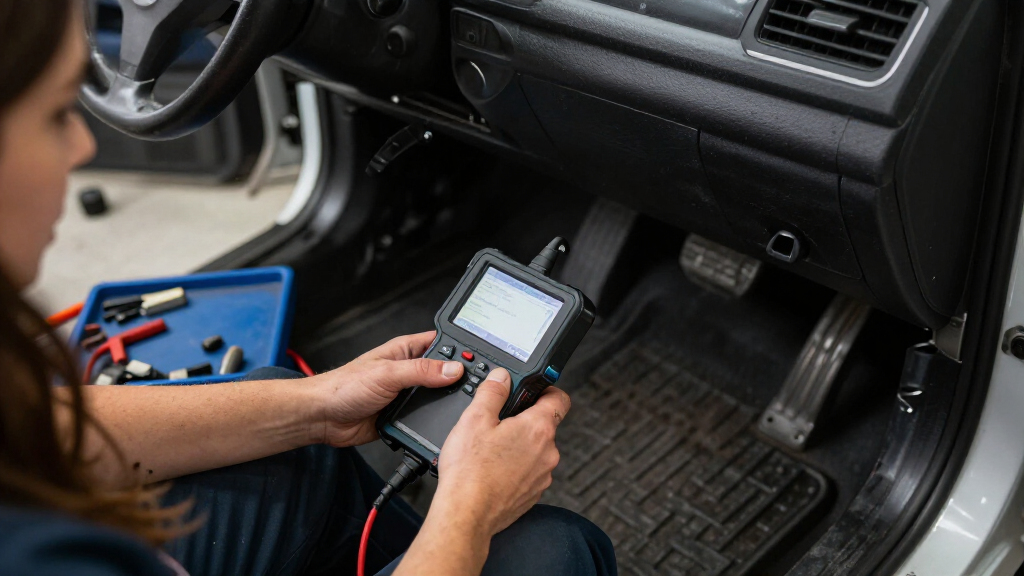

When a warning light appears, the decision is whether you need a quick explanation of an engine fault or a tool that can investigate systems throughout the car. Basic OBD-II code readers focus on standardized emissions diagnostics, often at a low purchase price. Professional bidirectional scan tools add wider vehicle coverage, live data, service functions and, on supported vehicles, active tests that command components.

Get business pricing on garage and car supplies
- Business-only prices and quantity discounts
- Tax-exempt purchasing
- Multiple users, one account, clear invoices
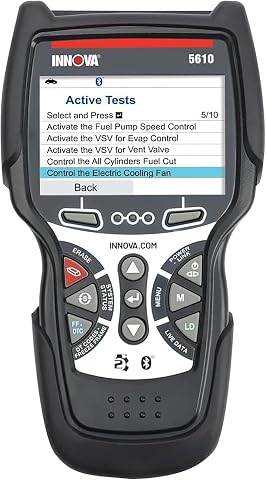
Innova 5610 OBD2 Bidirectional Scan Tool
- ✔ Vehicle compatibility: Most 1996–2023 OBD2 vehicles; coverage varies
- ✔ Functions: Bidirectional controls, enhanced live data, selected reset and relearn procedures
- ✔ Systems with live data: Engine, transmission, ABS, and SRS
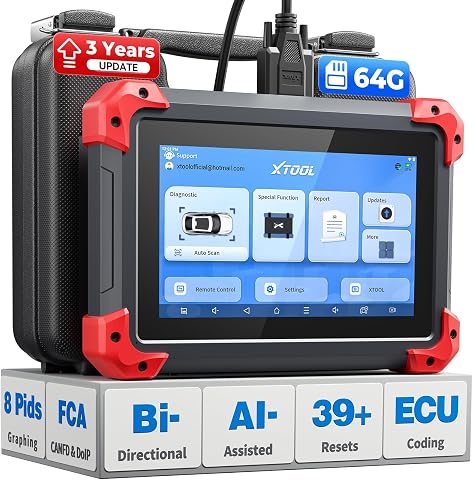
XTOOL D7 Bidirectional OBD2 Scan Tool with ECU Coding and 39+ Reset Functions
- ✔ Storage: 64 GB
- ✔ Battery: 5000 mAh; 2500 mAh 7.3V fast-charging
- ✔ Special functions: 39+

THINKCAR ThinkScan Plus S7 OBD2 Diagnostic Scanner
- ✔ Display: 5-inch touchscreen
- ✔ Operating system: Android 6.0
- ✔ Processor: Quad-core 1.3 GHz
The difference matters most when a fault sits outside the engine, when a repair requires resetting a service function, or when you need to test a suspected component instead of just reading a code. A basic reader is a sensible fit for occasional checks on a personal vehicle. A professional tool suits frequent repairs, multiple makes or advanced troubleshooting, provided its coverage matches the vehicles you work on.
At a Glance
| Criteria | Basic OBD-II code readers | Professional bidirectional scan tools | Winner |
|---|---|---|---|
| Standard engine codes | Reads and clears many standardized emissions-related OBD-II codes; capabilities vary. | Reads and clears standard codes, along with more advanced diagnostics where supported. | Tie |
| Vehicle system coverage | Usually centered on the engine and emissions systems. | Can cover systems such as ABS, airbags, transmission and body electronics, depending on the vehicle and tool. | B |
| Live data and diagnosis | Entry models may show limited data; enhanced models may include live readings. | Often offers broader live data and tests, but interpretation requires skill. | B |
| Active tests | Generally absent. | Available for supported vehicles and functions; tool and vehicle compatibility vary. | B |
| Service and reset functions | Usually limited; verify support before buying. | May include functions such as electronic parking brake service or steering angle reset; availability varies. | B |
| Ease of use | Typically simple menus and a short learning curve. | More menus and setup; functions may require updates, registration or a compatible subscription. | A |
| Purchase and ownership cost | Usually the lower-cost choice, with fewer features to maintain or learn. | Costs more; value improves with regular use and coverage of the vehicles you service. | A |
Innova 5610 OBD2 Bidirectional Scan Tool
The Innova 5610 is our best overall choice because its feature mix covers common owner and independent-repair needs without leaning entirely on a long list of specialized service functions. It reads enhanced live data from engine, transmission, ABS, and SRS systems, and its bidirectional controls can command selected vehicle functions. That can make it more useful than a code-only reader when we need to investigate a symptom or check a component response.Against the XTOOL D7, the Innova lists fewer headline service functions and active tests, but its stated capabilities are easier to match to a practical shortlist of systems. The ThinkScan Plus S7 also covers multiple systems, including body control and air conditioning, yet the Innova specifies bidirectional controls and selected relearn procedures as part of its feature set. Free updates and ASE-certified support add reassurance for buyers who want ongoing help without a subscription. The tradeoff is that coverage varies by vehicle: not every reset, test, or live-data item will apply to every supported OBD2 car. Its stated compatibility runs through 2023, so owners of newer vehicles should confirm fit before buying.
Pros:
- Bidirectional controls test selected vehicle functions.
- Live data covers engine, transmission, ABS, and SRS.
- Free updates with no subscription fees.
- ASE-certified support and RepairSolutions2 app compatibility.
Cons:
- Vehicle and function coverage varies by make, model, and year.
- Some advanced functions are limited to select vehicles.
- Stated compatibility is for most OBD2 vehicles through 2023.
Best for: Owners and DIY mechanics who want enhanced data across major systems plus selected bidirectional tests, with update and support details clearly stated.
Not ideal for: Buyers who need guaranteed support for a specific advanced function, a broad set of specialized service routines, or confirmed compatibility with vehicles newer than the stated range.
Bottom line: For a balanced mix of multi-system data and practical bidirectional controls, the Innova 5610 is the most approachable first choice in this lineup.
“For a balanced mix of multi-system data and practical bidirectional controls, the Innova 5610 is the most approachable first choice in this lineup.”
XTOOL D7 Bidirectional OBD2 Scan Tool with ECU Coding and 39+ Reset Functions
When diagnostic depth and service breadth matter most, the XTOOL D7 has the strongest stated specification set here. It combines full-system scans and bidirectional controls with over 4,000 active tests and more than 39 reset and maintenance functions. The practical draw is range: a capable user may be able to move from reading data to commanding a supported component or performing a supported service procedure on the same device.That breadth puts it ahead of the Innova 5610 on the number of listed active tests and service functions. It also graphs up to eight live-data PIDs, which can help us compare changing sensor readings while diagnosing a symptom. The ThinkScan Plus S7, by contrast, offers a more limited service selection: owners choose five functions from 28. The D7’s larger feature set does not guarantee that every procedure works on every car, however. Its stated coverage excludes Indian models, and buyers should confirm support for their exact vehicle and intended function. Three years of free updates is a defined update window, while the Innova lists free updates without the same duration in the provided details. With many controls available, this scanner best suits buyers comfortable checking coverage and interpreting test results.
Pros:
- Over 4,000 listed active tests with bidirectional controls.
- More than 39 reset and maintenance functions.
- Graphs up to eight live-data PIDs.
- Three years of free updates and support for FCA, CAN FD, and DoIP protocols.
Cons:
- Indian vehicle models are excluded from stated coverage.
- Advanced function availability depends on vehicle compatibility.
- The large feature set may be more than a casual code-reading user needs.
Best for: DIY mechanics and experienced owners who want a wide toolkit of active tests, live-data graphing, and maintenance procedures in one scanner.
Not ideal for: Buyers who want a very simple code reader, need coverage for Indian vehicle models, or expect every listed function to work on their particular car without verification.
Bottom line: The XTOOL D7 is the breadth-first choice for buyers prepared to verify fitment and make use of its extensive active-test and service functions.
“The XTOOL D7 is the breadth-first choice for buyers prepared to verify fitment and make use of its extensive active-test and service functions.”
THINKCAR ThinkScan Plus S7 OBD2 Diagnostic Scanner
The ThinkScan Plus S7 suits buyers who want system diagnostics presented through a dedicated touchscreen device. Its five-inch display and listed coverage of seven systems—engine, ABS, SRS, transmission, body control, air conditioning, and dashboard—give it a wider system scope than a basic engine-only scanner. It also provides fault-code lookup, live data, and wireless software updates.Compared with the Innova 5610, the S7 names body control and air conditioning among its diagnostic systems, while the Innova foregrounds bidirectional controls and selected relearn procedures. The XTOOL D7 is the stronger fit if we want the biggest stated collection of active tests and maintenance functions. The S7’s central limitation is its service selection: it offers 28 maintenance options, but the user can choose only five. That means we should check the available options against our vehicle and likely maintenance needs before purchase. Its support for 94 car brands is a useful breadth indicator, but brand count alone does not establish that every function is supported on every model year.The S7 therefore lands third in this comparison: it offers a distinct touchscreen and multi-system profile, but its selected-service constraint and less explicit bidirectional capability make the other two stronger picks for buyers prioritizing hands-on component testing or service breadth.
Pros:
- Touchscreen interface with wireless software updates.
- Diagnoses seven systems, including body control and air conditioning.
- Live sensor data and fault-code lookup.
- Supports 94 car brands according to the supplied specifications.
Cons:
- Only five of 28 maintenance services can be selected.
- Brand coverage does not guarantee every feature for every model.
- Its listed specifications do not describe bidirectional testing as explicitly as the other two tools.
Best for: Owners who prefer a touchscreen scanner for multi-system code lookup and live data, and whose needs fit within five selected maintenance services.
Not ideal for: Buyers who need a broad active-test catalog, want to switch among many maintenance functions, or require confirmed support for a specific vehicle procedure.
Bottom line: The ThinkScan Plus S7 makes sense when touchscreen operation and seven-system coverage matter more than a large, changeable service menu.
“The ThinkScan Plus S7 makes sense when touchscreen operation and seven-system coverage matter more than a large, changeable service menu.”
As an Amazon Associate we earn from qualifying purchases.
Key Differences
The core difference is how far diagnosis can go. Both categories may read standard OBD-II engine codes, but a code is a starting point, not a verdict on which part has failed. A basic reader can help identify a fault category and clear a code after a repair. A professional tool can add information from other modules and, when supported, run active tests. That broader access helps narrow the cause, though it does not replace service information, sound diagnostic practice or vehicle-specific compatibility checks.
That added capability has a cost in money and time. Professional tools can require software updates, subscriptions, registration or a learning period, and advertised functions do not necessarily work on every make, model and year. For one older vehicle and occasional warning lights, paying for broad functions may bring little practical return. For a household with varied cars, a hands-on enthusiast or a working technician, access to additional systems and service procedures can save repeated trips to a shop or make repair work more efficient.
Detailed Comparison
Standard engine codes (minor difference)
Both can read and clear many standardized emissions-related codes, so the basic reader ties on the central task behind a check-engine light. A professional tool may show more supporting data, but that does not make every diagnosis certain. This gap is minor for a driver who only wants to know what code appeared; check that the reader supports the vehicle and desired code types.
Vehicle system coverage (Professional bidirectional scan tools wins — major)
Professional tools win by a major margin when the problem involves ABS, airbags, transmission or body electronics. Many basic readers concentrate on engine and emissions information, so they may not communicate with the module that stored the fault. In practice, wider coverage can expose a fault that a basic scan would miss. Actual access depends on the car, tool model and software, so confirm coverage by year, make and model before purchase.
Live data and diagnosis (Professional bidirectional scan tools wins — moderate)
Professional tools usually provide more live readings, graphing or module data, giving an experienced user more ways to compare a symptom with sensor behavior. The advantage is moderate: more data can narrow a search, but it can also overwhelm a novice and does not prove which component is faulty. Basic models may offer only a small set of readings, which is often enough for a quick check but not a detailed investigation.
Active tests (Professional bidirectional scan tools wins — major)
Bidirectional tools win by a major margin because they can command supported components, such as operating a fan or solenoid, and let a technician observe the response. A basic reader generally retrieves information without controlling vehicle components. Active tests can help separate an electrical or mechanical fault from a sensor or control issue, but they require judgment and can be unavailable on a specific vehicle even when the tool advertises the feature.
Service and reset functions (Professional bidirectional scan tools wins — moderate)
Professional tools usually offer more maintenance procedures, such as an electronic parking brake service mode or steering angle reset, so they win by a moderate margin for owners doing their own repairs. A basic reader may clear a code but often cannot complete a procedure needed after replacing a component. Coverage varies considerably; verify the exact function for the car rather than assuming a long feature list applies to every model.
Ease of use (Basic OBD-II code readers wins — moderate)
Basic readers win by a moderate margin for occasional users. Their smaller feature set tends to make connecting, retrieving a code and looking up its meaning straightforward. Professional devices involve more menus and may require software setup or interpretation of unfamiliar data. A capable tool is useful only if its operator can use it correctly, so the simpler option fits drivers who want a quick first check and little learning overhead.
Purchase and ownership cost (Basic OBD-II code readers wins — major)
Basic readers win on cost by a major margin: they generally require less upfront spending and have fewer advanced features to keep current. Professional models cost more and may carry update or subscription expenses. That premium is worthwhile for regular use across several vehicles or paid repair work, where extra access can reduce diagnostic limitations. For rare checks on one car, the additional cost is difficult to justify.
Basic OBD-II code readers: Pros and Cons
Pros:
- Lower purchase cost for occasional code checks.
- Simple operation suits drivers with little diagnostic experience.
- Can read many standard engine and emissions codes.
Cons:
- May not access ABS, airbag, transmission or body modules.
- Usually lacks active component tests.
- Often cannot perform specialized service procedures.
Professional bidirectional scan tools: Pros and Cons
Pros:
- Broader system access on supported vehicles.
- Live data and active tests can help narrow faults.
- May handle service functions needed during repairs.
Cons:
- Higher purchase and possible update or subscription costs.
- More complex to learn and interpret accurately.
- Coverage and advertised functions vary by vehicle.
Who Should Choose What
Choose Basic OBD-II code readers if:
- You want to read a check-engine code on one personal vehicle and only scan occasionally.
- You prefer a low-cost, simple tool and are comfortable using a shop for module-specific diagnosis.
- You want a first clue before deciding whether a warning light needs professional attention.
Choose Professional bidirectional scan tools if:
- You regularly diagnose or repair several makes and need access beyond engine codes.
- Your work involves ABS, transmission, airbag or body system faults.
- You need supported active tests or service functions as part of repairs.
Skip both if: You need a confirmed diagnosis for an urgent or safety-related fault but lack the tools or experience to interpret results; arrange a qualified inspection.
Value for Money
Pay more for a professional tool when you will use its wider coverage, active tests or service functions repeatedly. For a home mechanic repairing multiple vehicles, one compatible tool can provide useful access that a basic reader cannot. For a driver who checks a single car a few times a year, the premium buys features that may sit unused; a basic reader is better value, and a repair shop can handle advanced scans as needed.
Compare ownership costs as well as the purchase price. Some advanced devices rely on ongoing updates or paid features, and compatibility can vary by vehicle year and module. Before paying extra, confirm the exact functions you need and whether they work with your car. A long feature list is poor value if your vehicle is not supported.
Final Verdict
For most drivers seeking occasional insight into a check-engine light, choose a basic OBD-II reader. It handles the common first question at lower cost and with less complexity. Choose a professional bidirectional tool if you diagnose several vehicles, repair systems beyond the engine or need active tests and service procedures; its higher price can pay back through regular use. The biggest deciding factor is whether you need broader vehicle access, not simply a more detailed display. Confirm vehicle coverage before buying either category.
Frequently Asked Questions
Can a basic OBD-II reader tell me exactly what part to replace?
No. A code identifies a detected condition or system, not always the failed component. Use it as a diagnostic clue, then check related symptoms and test results before replacing parts.
Will a professional scan tool work with every car?
No. Coverage depends on the tool, the vehicle’s make, model and year, and sometimes paid software or subscriptions. Check compatibility for the specific modules and functions you need.
Is a bidirectional scanner worth it for a home mechanic?
It can be if you regularly work on different vehicles or need active tests and service functions. If you only check standard engine codes once in a while, a basic reader is usually better value.
Should I clear a warning code after scanning?
Only after recording the code and addressing the cause. Clearing it can erase useful diagnostic information, and the warning may return if the fault remains.
Fall Picks
fall essentials
As an affiliate, we earn on qualifying purchases.