TL;DR

Get business pricing on garage and car supplies
- Business-only prices and quantity discounts
- Tax-exempt purchasing
- Multiple users, one account, clear invoices
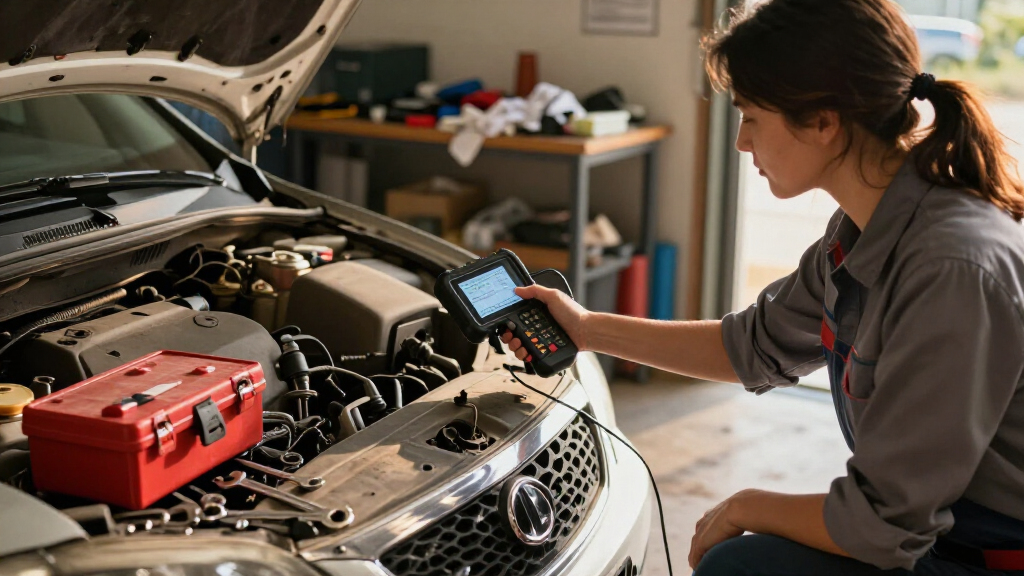
Car diagnostic scan tools plug into your vehicle’s OBD-II port (standard on all US cars since 1996) and read Diagnostic Trouble Codes plus live sensor data from the car’s computer. Basic code readers cost $20–50, Bluetooth adapters with smartphone apps run $20–100, and professional bidirectional tools start around $300. A scan tool tells you what the computer flagged — not why — so it’s best used to understand a problem before heading to a shop.
The mechanic just quoted you $150 to diagnose a check engine light. Here’s the part that stings: the information he pulled took about ninety seconds to retrieve with a tool that costs less than a dinner out.
Car diagnostic scan tools (also called OBD scanners or code readers) read the trouble codes stored in your car’s computer — the same codes a shop uses to build its estimate. Plug one in, and suddenly that mysterious amber light becomes a specific, researchable problem.
In this guide, you’ll learn what scan tools actually do, the four tiers you can buy, what they can’t do (this trips people up constantly), and how to run your first scan without setting anything on fire.
Any US car from 1996 onward has the same 16-pin OBD-II port, so one cheap scan tool covers nearly every vehicle you’ll ever own.
Basic code readers ($20–50) only see engine/emissions codes — ABS and airbag diagnostics require a mid-range or better tool.
Always write down every code before clearing, and never clear codes right before an emissions test (readiness monitors need days to reset).
A scan tool reports symptoms, not root causes — a P0420 catalytic converter code is often actually a bad oxygen sensor.
Avoid counterfeit ELM327 clone chips in ultra-cheap Bluetooth adapters, and unplug dongles when not in use for security.
What a Car Diagnostic Scan Tool Actually Tells You
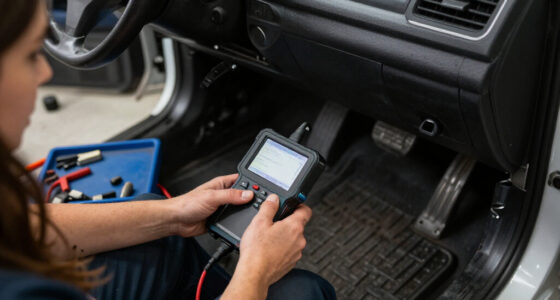
A car diagnostic scan tool is a device that connects to your vehicle’s OBD-II port and reads fault codes, live sensor data, and emissions readiness from the car’s onboard computers. It’s the same first step every technician takes, whether the fix is a loose gas cap or a dying catalytic converter. Understanding what the tool is actually doing — and why the standard exists — changes how you use it.
Since 1996, every light-duty vehicle sold in the US uses the standardized OBD-II system with the same 16-pin connector [1]. The standard wasn’t a gift to DIYers — it was mandated by the EPA so emissions testing could be enforced uniformly. The side effect is that it leveled the diagnostic playing field: before OBD-II, each manufacturer used proprietary connectors and code languages, meaning a Ford scanner was useless on a Toyota and only dealers had access. Now a single cheap tool covers your sedan, your partner’s SUV, and the used truck you’re eyeing at the dealership. That’s also why used scan tools hold their value and why you never have to worry about compatibility when you change vehicles. Europe followed with EOBD — petrol cars from 2001, diesel from around 2004. Your port lives under the dashboard, usually within arm’s reach of the steering column. Crouch down, look left of the pedals, and you’ll spot it.
Here’s the mental model that matters: your car’s computer doesn’t know what’s broken. It knows what readings went out of range. The computer constantly compares sensor inputs against expected values, and when the oxygen sensor reports data that makes no sense, it stores a code like P0135 and turns on the light. The code points at the symptom, not always the cause — a clogged catalytic converter code (P0420) can actually be caused by a bad upstream sensor feeding skewed data. That distinction is where DIYers get burned: they read “catalytic converter,” price a $1,200 replacement, and panic — when the real culprit is a $60 sensor. It’s also precisely why shops charge for diagnosis: someone has to bridge the gap between code and cause using freeze-frame data, live sensor readings, and component tests. When you understand this, you also understand what you’re really paying a shop for — judgment, not code retrieval.
Think of it like a fever thermometer. It tells you something’s wrong and gives you a number. It doesn’t prescribe medicine — a 102°F reading could mean flu, an infection, or a bad thermometer, and figuring out which is a separate skill.
Live data is the underused half of the tool, and arguably the more valuable half. Beyond stored codes, a scan tool can stream real-time sensor values — coolant temperature, fuel trims, oxygen sensor voltages — while the engine runs. This is where a code becomes a diagnosis-in-progress: watching fuel trim climb to +25% at idle tells you the engine is adding far more fuel than baseline, which points toward a vacuum leak long before any single code confirms it. The tradeoff is skill — live data only pays off if you’re willing to learn what normal looks like for your car. Most owners never touch this feature, which is fine; it’s there when a code alone doesn’t settle the question.
The 4 Types of Scan Tools (and What Each Costs)
Scan tools fall into four price tiers, from basic code readers under $50 to professional systems costing thousands. The tiers aren’t arbitrary marketing brackets — each one represents a genuine capability jump, and the right one depends on whether you just want to know why the light is on or you plan to dig into ABS, airbag, and transmission systems.
| Type | Price | What It Does | Best For |
|---|---|---|---|
| Basic code reader | $20–50 | Reads and clears codes, checks engine light | “What’s that light?” moments |
| Bluetooth adapter + app | $20–100 | Codes, live data, app features (Torque, BlueDriver, FIXD) | Most DIY owners |
| Mid-range handheld | $50–300 | Live data, freeze frame, some ABS/SRS, service resets | Hands-on DIYers |
| Professional tool | $300–several thousand | Bidirectional controls, module programming (Autel, Launch, Snap-on) | Shops and serious hobbyists |
The tradeoffs between tiers are about capability, not just price — and each jump buys something specific. A basic reader answers one question — “what code is stored?” — and nothing else; it can’t help you distinguish a real problem from a glitch. A Bluetooth adapter adds live data and graphing, which turns a static code into a moving picture of what the engine is doing, and that’s often the difference between guessing and knowing. A mid-range handheld unlocks ABS and airbag modules plus service resets (like turning off the oil-change reminder after doing your own service) — meaningful if you maintain your own cars, wasted money if you don’t. Professional tools are bidirectional, meaning they don’t just listen — they can command components to actuate. That’s the difference between suspecting a bad idle-air-control valve and commanding it to open and watching whether the RPMs respond. The catch at the top tier: bidirectional power on modern cars often requires buying make-specific software licenses per manufacturer, which is why a “$400” tool can quietly become a $900 one.
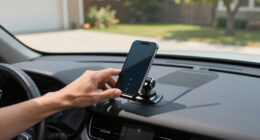
For most people, the Bluetooth adapter plus a smartphone app is the sweet spot [1]. You get live data streaming on a screen you already own, no extra device to lose in a glovebox, and free app updates instead of firmware hassles. Apps like BlueDriver even generate repair reports ranked by how often a given code leads to a specific fix on your exact model — so if P0420 on your exact Accord most often turns out to be the rear oxygen sensor, you’ll know before spending anything. The implicit tradeoff is that you’re trusting the app maker’s data quality, and phones die or lose pairing mid-session; standalone tools don’t.
Concrete example of how tiers play out: your ABS light comes on. A $30 code reader shows nothing — the ABS module isn’t accessible, so you’d wrongly conclude “no codes stored.” A $100 BlueDriver reads the code (say, a wheel-speed sensor fault). A $400 Autel can command the module to run a self-test and bleed the ABS pump after the repair. Same warning light, three very different levels of resolution — and the cheap tool’s silence is actively misleading, not just unhelpful.
Warning: many cheap ELM327 adapters use counterfeit clone chips [1]. They work — sometimes — but drop connections and report garbage data. A tool showing a live coolant temperature of -40°F on a warm engine isn’t a minor annoyance; garbage data is worse than no data, because it sends you diagnosing problems that don’t exist. Buy from a reputable brand, not the cheapest listing on the shelf.
How to Run Your First Scan in 6 Steps
Using an OBD2 scanner takes under five minutes once you’ve located the port. But the steps have reasons behind them, and knowing why each one matters is what separates a useful scan from a wasted one. Here’s the whole process, start to finish.
- Find the port. Under the dash, driver’s side, near the steering column. It’s always within reach of the driver’s seat because the standard requires it — you won’t need to disassemble anything.
- Turn the ignition to “on” — the dash lights up but the engine usually doesn’t need to run. The computer must be awake to talk to the scanner; a dead ignition means no communication, which beginners often mistake for a broken tool.
- Plug in the scanner (or pair the Bluetooth adapter to your phone). If pairing fails, the usual culprit is a counterfeit chip, not your technique.
- Read the codes. Write them down — every single one, exactly as shown. Cars often store old codes alongside the current problem, and a code’s freeze-frame data (the snapshot of conditions when it set) disappears when cleared. This written record is your evidence if the problem is intermittent or if you want a second opinion at a shop.
- Look up each code for your specific make, model, and engine before touching anything. The same code can mean very different fixes on different engines — P0420 on one model may overwhelmingly be a sensor, on another a genuine converter failure. Model-specific forums and repair databases are more valuable than generic code lists.
- Decide whether to clear. Clearing resets the code AND the emissions readiness monitors [1]. Only clear after you’ve recorded the codes and fixed (or ruled out) the likely cause — otherwise you’ve destroyed the evidence trail.
That last step matters more than people think. If your state requires a smog test, clearing codes right before the test causes an automatic fail — the car needs days of normal driving across varied conditions (cold starts, highway, city) to reset its readiness monitors. Clearing also erases the freeze-frame data a mechanic would use, so if the problem returns, you’ve made diagnosis harder, not easier. The disciplined approach: record codes, fix the issue, then clear and verify the light stays off.
Real example of the whole workflow: your light comes on after a fill-up, and the scanner shows P0442 (small evap leak). You look it up, learn the most common cause is a loose or worn gas cap, check it, find it loose, tighten it, clear the code. Light stays off. You just saved a diagnostic fee on a two-second fix — and more importantly, you confirmed the fix rather than hoping.
What a Scan Tool Can’t Do (Stop Expecting Miracles)
A scan tool tells you what the computer flagged — it does not tell you which part to buy. This is the single most common misconception, and it’s why a $25 code reader doesn’t replace a $150/hour technician. The tool outputs a symptom description; turning that into a repair requires testing components, interpreting live data, and knowing failure patterns for your specific model. The implication for your wallet: a scan tool saves you the diagnostic fee when the problem is simple, and saves you from blind part-replacing when it isn’t — but it never substitutes for judgment.
Cheap tools have another blind spot, and it’s worse than a missing feature: most basic code readers only access the engine and emissions systems. If your ABS light or airbag warning is on, a $30 reader often shows nothing at all — which owners misread as “no problem found” when it really means “tool can’t see that system.” Reading body and chassis modules requires a mid-range or better tool with manufacturer-specific coverage [1], because those systems were never part of the emissions mandate that forced standardization.
Two more limits worth understanding, not just memorizing:
- EVs like Teslas mostly need specialized tools — a generic OBD2 scanner gets you very little [1]. The reason is architectural: EVs don’t have emissions systems, so the regulations that forced open diagnostics barely apply. Tesla handles most diagnostics through its own app and service network, which means the DIY scanning playbook largely doesn’t carry over — a real tradeoff to weigh before buying an EV if self-repair matters to you.
- Newer vehicles using DOIP (diagnostics over Ethernet) can stump cheap ELM327 clones entirely [1]. The adapter connects, then errors out — the car’s diagnostic system simply speaks a language the clone can’t handle. The implication: if your household includes a late-model vehicle, check the adapter’s supported protocols before buying, or you’ll own a tool that works on the old car and not the new one.
Here’s the practical implication of all this: a scan tool is a decision-making tool, not a repair tool. Its real value is triage. A P0300 random misfire code tells you the shop visit is unavoidable — misfires can cook a catalytic converter fast, so driving on it is a gamble. A P0442 evap code tells you to check the gas cap first. Knowing which situation you’re in is what saves money — not the tool replacing the mechanic. That triage judgment is the actual skill you’re buying the tool to develop.
And a hard safety line: anything involving brakes, airbags, or high-voltage EV systems is a job for a certified mechanic. A scanner that reads an airbag code doesn’t qualify you to open that system — airbag components hold stored energy and can deploy; EV high-voltage systems can kill. Reading is safe; wrenching there is not. Also check whether your vehicle has open recalls at NHTSA.gov/recalls — free, takes thirty seconds, and sometimes the “problem” you’re diagnosing is a known recall fix. Example: plenty of owners have chased a check engine light that turned out to be a recalled emissions component the dealer would have fixed for free. Checking recalls first should honestly be step zero of any diagnosis.
Before You Buy: 5 Questions That Pick the Right Tool
The right scan tool depends on your car’s age, which warning lights you care about, and whether a subscription app fits your budget. But the questions matter because each one eliminates a whole tier of tools — answer them in order and the buying decision mostly makes itself. Answer these before spending a dime.
- Is your car 1996 or newer (US)? If yes, any OBD-II tool physically fits, and compatibility stops being a concern entirely. Older cars need OBD-I era, manufacturer-specific adapters — often more hassle and cost than the car justifies. Example: a 1993 Honda needs a jumper-wire trick plus counting dashboard flashes, not a plug-in scanner. The tradeoff to weigh honestly: for a cheap older car, the money may be better saved toward its replacement.
- Do you need ABS and airbag codes? This is the single biggest capability divider in the market. If yes, skip basic readers — budget for a mid-range handheld or a BlueDriver-class tool, because a cheap reader will show “no codes” and mislead you. If the only light you ever care about is the check engine light, the cheap tier does everything you need, and paying more buys capability you’ll never invoke.
- Phone or standalone? Bluetooth adapters need an app; some (FIXD, Hum) push subscriptions for full features [1]. Read the fine print — a $20 adapter with a $10/month app is a $120/year tool, and those costs recur whether you use it or not. Standalone handhelds usually have no recurring cost, which matters if you’re a use-it-twice-a-year owner. The honest tradeoff: apps offer better screens and graphing; handhelds offer zero dependence on a phone battery and pairing.
- DIY or shop-bound? If you’ll never turn a wrench, you only need code reading — the free scan at many US auto parts stores covers even that [1]. The tool’s value to you is knowledge before the shop visit, not repairs — and that knowledge is worth real money when it stops you accepting a padded estimate. But don’t buy capability you won’t use; a $300 tool in a non-DIY household is a $300 flashlight.
- Security matter? It should. Poorly secured OBD dongles left plugged in are a known attack vector [1]. The OBD port is a direct line into your car’s computer network — a dongle that stays paired is a wireless door into it, and researchers have demonstrated attacks through exactly this gap. Unpair and unplug when you’re done. It’s a five-second habit that closes a real hole.
One more free option: before buying anything, swing by a parts store. Most will read your codes for free, hoping you’ll buy the part from them. Use that scan as a trial run — it tells you which warning systems you actually need coverage for. If the free scan reveals an ABS code your family’s cars keep throwing, you’ve just learned you need mid-range coverage, not a guess. The stores aren’t being generous; they’re betting on parts sales — but that’s a trade you can take advantage of while it costs you nothing.
Frequently Asked Questions
Will a scan tool work on my car?
If your car is a 1996 or newer US model (2001+ petrol in Europe), yes — the OBD-II standard uses the same 16-pin connector on all of them [1]. Cars from 2008 on also use the CAN protocol, which every current scanner supports. Tesla and some EVs are the exception; they need specialized tools.
Is it safe to clear codes myself?
Yes, clearing codes is safe and won’t harm the car — but write them down first, because they’re your only record of the problem. Clearing also resets emissions readiness monitors, so if you have a smog test coming, the car needs several days of driving before it will pass.
Why did my check engine light come back after I cleared the code?
Because the underlying problem is still there. Clearing a code just resets the light; the computer re-detects the fault and re-sets the code, often within a few drive cycles. The light coming back is actually useful information — it confirms the issue is real and persistent, not a one-off glitch.
Will using a scanner void my warranty?
Generally no. Reading codes is passive and doesn’t modify anything. Even clearing codes doesn’t void warranty coverage, though repeatedly clearing to hide an active problem can complicate a warranty claim if the dealer sees no documented history of the fault.
Bluetooth adapter with an app, or a handheld scanner — which is better?
For most owners, Bluetooth plus an app wins: bigger screen, graphing, saved reports, and $20–100 total cost [1]. Handhelds make sense if you want something that always lives in the glovebox, works without a phone, or covers ABS/SRS at the mid-range tier. Avoid the very cheapest adapters — counterfeit ELM327 chips cause dropped connections and bad data.
Conclusion
Buy the cheap tool anyway. Even if you never fix a thing yourself, walking into a shop already knowing your codes — and having looked them up — changes the entire conversation. You’ll ask better questions, decline mystery diagnostics, and spot padded estimates from across the counter.
That check engine light is your car talking. For twenty-five dollars, you finally get to hear what it’s saying.
Evergreen bestsellers Picks
bestsellers
As an affiliate, we earn on qualifying purchases.